
FaceLCD Hong Kong Limited
Tel: +8615818692944
E-mail: sales@facelcd.com
Address: 13F, Buiding B, Colorful Tech Park, Guanlan High tech park, Longhua Dist, Shenzhen,China ZIP code 518100
You are here: Home > Technology >
An industrial LCD display is integrated into a piece of equipment which could be used for multiple hardware iterations. This choice will impact the layout of the cabinets, ease of access to the operator, spare parts and work needed if the screen gets damaged some day.
So the question for equipment engineers, system integrators and maintenance buyers is more expansive than the screen size. What display set up will work in the real installation and be maintainable? Firstly, check the machine environment and determine the purchase quantity of the display assembly.
The conditions are not the same between a control screen at a ventilated production line and a screen at a heat-producing cabinet, which is enclosed. Document the location of the display, the approach of the operator to the display and events that occur at start-up, during normal production, when the display is shut down and when it is serviced.
FaceLCD’s industrial control display applications include HMI systems and automation equipment. Use that context to explain a particular installation and don't ask for some “industrial-grade” screen. Each of their requirements must be defined ambient light, dust exposure, mounting vibration and internal heat.
Distinguish between measured and assumed conditions. If not known, check the temperature behind the front panel before choosing components based on the workshop room temperature. The installation brief should be clear to the supplier so that they will know which requirements require model-specific evidence.
A bare module allows a equipment designer to have control of the surrounding electronics and mechanical structure. That freedom also means that the team designing the displays must handle the driving, back light power, cable routing and mounting. It is suitable for a project that already includes these functions in the machine design.
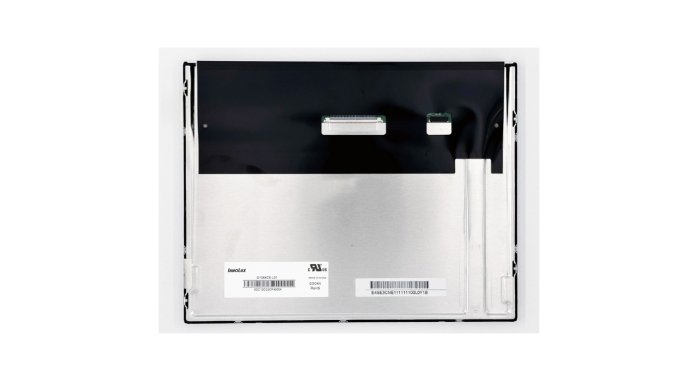
FaceLCD offers the Innolux G104XCE-L01 industrial LCD module that features a 10.4-inch display, 1024 × 768 resolution and LVDS interface. It's not a full monitor to accept any external video source, but it's a concrete starting point for an embedded panel discussion.
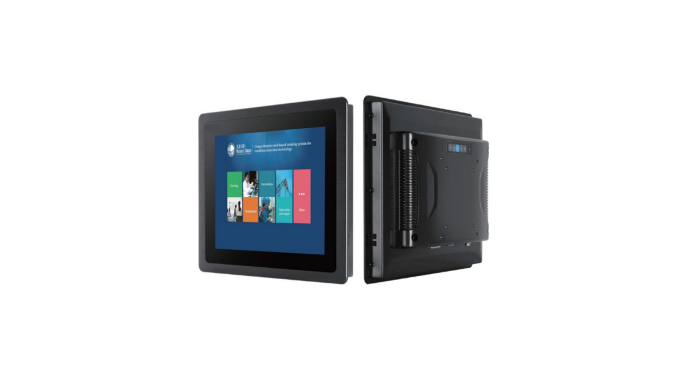
More functions are combined in an open frame assembly. FaceLCD's 10.4-inch open frame monitor features a display, capacitive touch, control electronics and mounting structure. Evaluate the integration work of each route with your team. Don't assume that the same diagonals translate to equal cutout, connections, or service procedure.
Not every operating range of the display system can be obtained by using a wide-temperature LCD. Other components, such as the controller board, touch assembly, power conversion, etc., may set other limits. Check each component for expected local conditions within the cabinet.
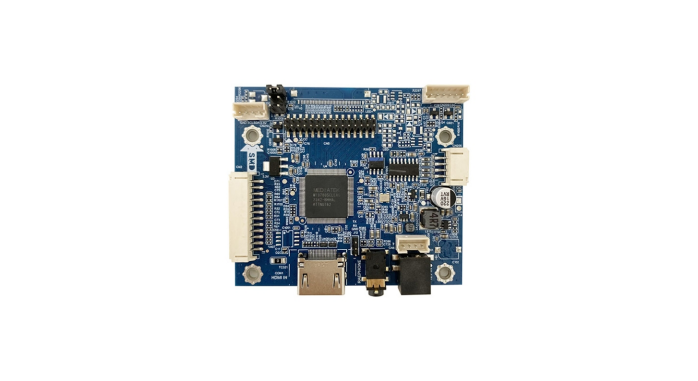
In comparison, FaceLCD's FB73 industrial HDMI LCD driver board is rated to operate between −20°C and 70°C. These are not vouchs for a same product pairing. They show why the range of a panel cannot just be copied to an assembled system specification.
When considering combinations, first check electrical compatibility and then thermal design. Ask for current specifications, and specify measurement locations for temperatures. Storage limits, operating limits and the full machine valid conditions should be kept separate in the approval record.
The screen must be readable, where people actually work. Review smallest important values, alarm text and trend lines from normal standing position. The reflections of overhead lights or a window nearby can be more important than a demo image may indicate.
With increased backlight output, it'll be of assistance in bright conditions, but the power and thermal conversation alter as well. Check the correct setting with a representative front surface and apply the setting when evaluating the cabinet. Do not select the maximum brightness if it is not necessary to the installation.
Resolution also has an impact on replacement planning. The new panel format can change the size, scale and layout of existing controls in the panel. If you have an existing machine interface, check out the existing software at the desired native resolution prior to accepting a cosmetically appealing version.
An installation may pass the initial picture test with a cable under strain and/or a service connector unreachable. Look over the assembly sequence with the cabinet's drawing open. Determine how the screen will be supported, connected, inspected and removed without affecting other components.
In panel designs, double check pin assignment, timing of signals, backlighting needs and cable configuration. In monitor assemblies, test the external video input and touch separately. A supported input resolution doesn't affect the native resolution of the LCD.
State required cable restraint and clearance for the installation. If vibration or frequent door open/close is an issue, test the mounting and harness under those conditions. A metal frame is not a vibration rating and an open frame structure is not a dust or liquid rating.
Conduct the proposed assembly using representative software, power supply, and equipment in the immediate vicinity. Note the startup, dimming, repeated cycling and recovery after the conditions specified in the project test plan. Document sporadic behavior as well as any ongoing problems.
If you have touch, test it in use position with the input method to be used. Make sure the response requirement relates to the proposed configuration. Not all gloves or contaminated surfaces can be used on a touch enabled monitor.
Define the criteria of acceptable results prior to testing. Attach each result to a panel revision, controller configuration, cable and software version. A picture seen during a demo which is fine can be helpful but not in lieu of installation operating checks.
Check how the agreed configuration will be documented on subsequent orders and what the procedure is if there are changes in a component. Check availability and lead time for the quantity required – current product listing is not a long term supply commitment.
Keep approved mechanical and electrical references with service documents for the machine. Specify if maintenance is just for panel or consists of complete assembly. Having a clearly named spare can minimize confusion when buying and service is done without the original designer.
| Service Question | Document to Retain |
| Which assembly was approved? | Released bill of materials |
| How is it removed? | Illustrated service instruction |
| Which changes were accepted? | Approved change history |
The cabinet conditions are linked to and displayed on a suitable industrial LCD display, and can be installed, tested and maintained by the equipment team. Select integration with care, discuss component limits with each other and note the replacement configuration. These decisions turn the screen to be a machine component that is supportable.
Q1. What does the word “industrial” establish as far as a temperature range?
No – confirm the item specifications at time of order and confirm the assembly in the installation. Limits of systems are not only determined by the panel.
Q2. Is an open frame monitor a closed one for industry?
Not automatically. Request an ingress rating, front protection and housing integration separately. Maintain sealing requirements in equipment design brief.
Q3. Does 1080p input allow for a native 1080p on the XGA panel?
No. The input can be scaled by the controller, the panel resolution remains unchanged. Check scaling quality with software screens to be used.
Q4. Does bigger screen = better?
No. Assess readability in conjunction with reflections, power usage and cabinet temp at specified setting. Test via completed cover or front window.
Q5. Is it possible to replace an industrial display with an equal-sized screen?
Not automatically. Review mounting, interfaces, timing, power, and software action prior to acceptance of substitution. Keep the approved replacement reference for future orders.