
FaceLCD Hong Kong Limited
Tel: +8615818692944
E-mail: sales@facelcd.com
Address: 13F, Buiding B, Colorful Tech Park, Guanlan High tech park, Longhua Dist, Shenzhen,China ZIP code 518100
You are here: Home > Technology >
An HDMI Controller Board with HDR support can receive and process an HDR video signal, but this does not automatically make the connected LCD panel a true HDR display. The final image depends on the complete display architecture: source output, HDMI bandwidth, controller IC, firmware, EDID, panel interface, color depth, color gamut, contrast and backlight performance.
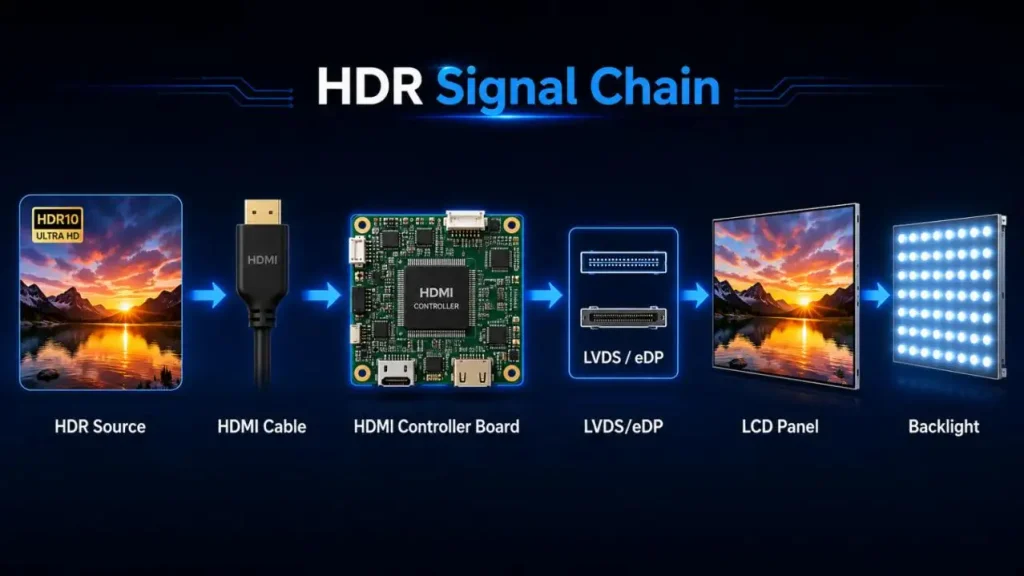
An HDMI Controller Board processes HDR video and converts it into a panel-compatible signal. Actual HDR performance is determined by whether the LCD panel, backlight, interface and firmware can reproduce the required luminance range, color information and grayscale detail.
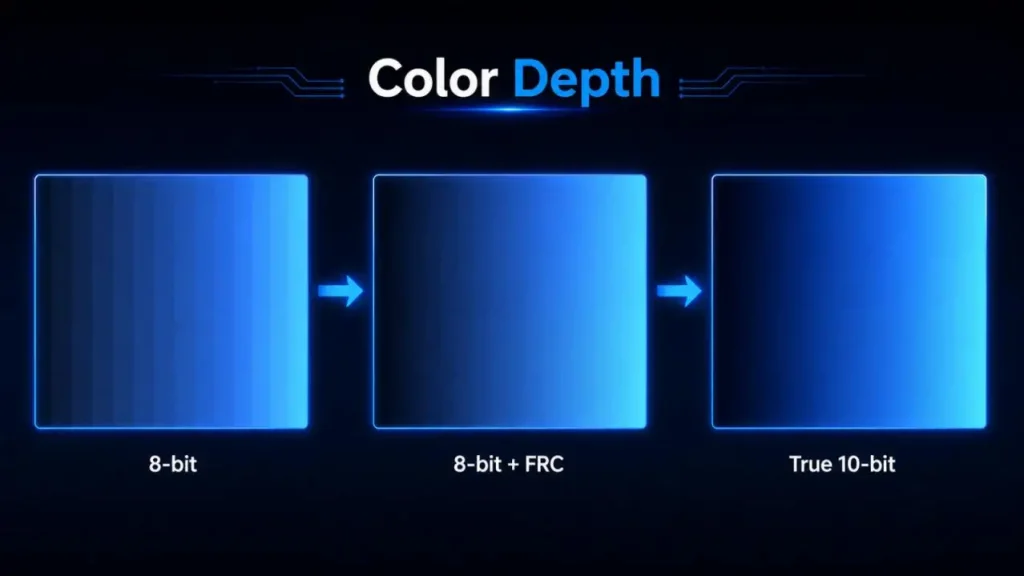
In practical engineering terms, HDR support means that the HDMI Controller Board can identify and process an HDR input format rather than simply accepting an HDMI connector.
A suitable board may need to:
• Read HDR-related EDID information
• Detect HDR10 or other supported metadata
• Process RGB and YCbCr color formats
• Handle 8-bit, 10-bit or higher input data
• Support the required resolution and refresh rate
• Perform scaling, color-space conversion and tone mapping
• Convert HDMI input to LVDS or eDP panel timing
• Coordinate backlight enable, dimming and power sequencing
These capabilities depend on the HDMI receiver, scaler IC, firmware and output interface. A board that accepts 4K HDR input may still output an 8-bit signal to a lower-gamut LCD panel.
The display path should be evaluated as one system:
HDR Source → HDMI Cable → HDMI Controller Board → LVDS/eDP Output → LCD Panel → Backlight
| Signal-Chain Element | Technical Function | Typical Limitation |
| HDR source | Outputs video, color format and metadata | Incorrect HDR, range or refresh-rate setting |
| HDMI cable | Transfers high-speed video data | Signal loss, limited bandwidth or poor shielding |
| HDMI Controller Board | Decodes, scales and converts the signal | Unsupported EDID, firmware or processing depth |
| LVDS/eDP interface | Transfers pixel data to the panel | Lane, channel or pixel-clock mismatch |
| LCD panel | Produces grayscale and color | Limited native color depth, gamut or contrast |
| Backlight system | Provides luminance | Insufficient brightness or no local dimming |
An HDMI Controller Board manages the signal, while the LCD panel and backlight determine how much of the HDR content is actually visible.
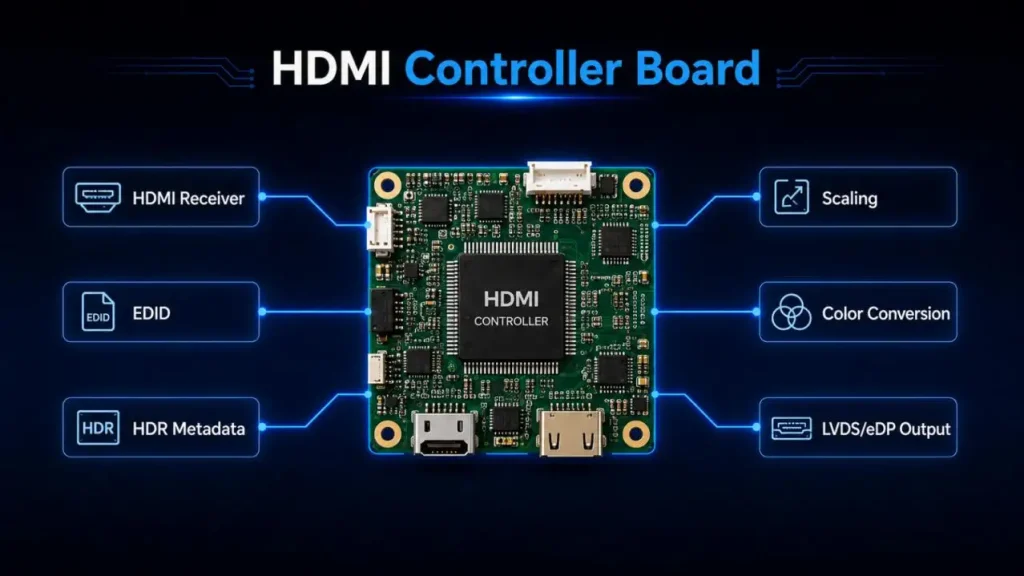
The HDMI Controller Board does not create panel luminance. Maximum brightness is mainly determined by:
• LED type and backlight power
• LED driver current
• Optical films and light-guide efficiency
• LCD cell transmittance
• Panel aperture ratio
• Power-supply capacity
• Thermal design
• Global or local dimming architecture
| Application | Typical Luminance Reference | Practical HDR Consideration |
| Indoor terminal | 250–400 nits | HDR input may be accepted, but highlights remain limited |
| Industrial HMI | 400–700 nits | Visibility and operating life are usually prioritized |
| Commercial display | 700–1,000 nits | Better separation of bright highlights |
| Outdoor display | Above 1,000 nits | Requires thermal, anti-glare and power management |
Brightness alone does not define HDR quality. Black level, contrast, color volume, grayscale tracking and EOTF accuracy must also be considered. A bright LCD with poor black performance may produce less convincing HDR than a lower-brightness display with better contrast control.
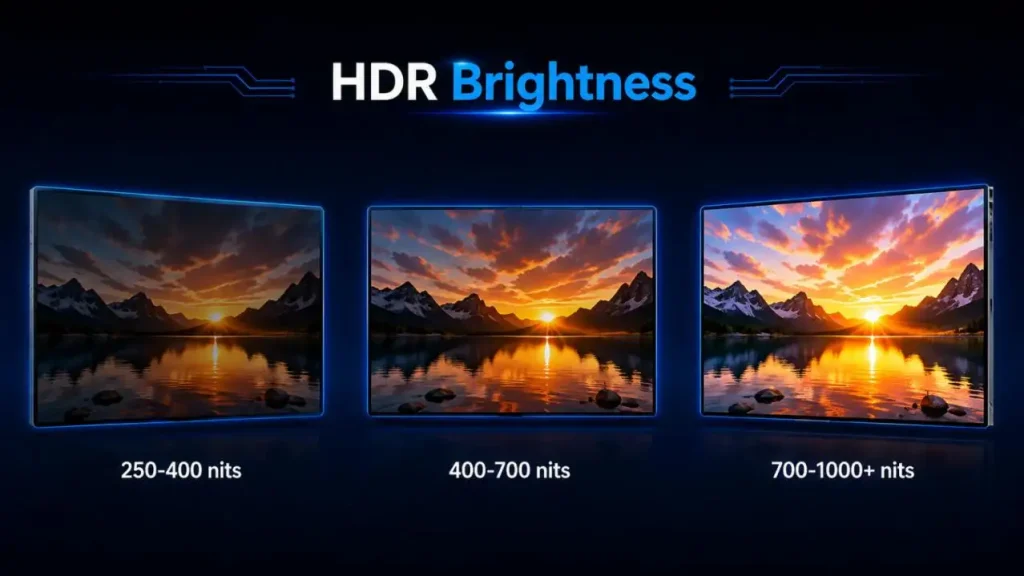
Color depth determines the number of available grayscale levels per RGB channel.
| Panel Type | Levels per Channel | Approximate Colors | Engineering Consideration |
| 8-bit | 256 | 16.7 million | May show banding in smooth gradients |
| 8-bit + FRC | Simulated 10-bit | Near-10-bit appearance | Uses temporal dithering |
| True 10-bit | 1,024 | 1.07 billion | Better for professional HDR gradients |
A 10-bit input specification does not confirm that the complete display path is 10-bit. Engineers should verify:
• HDMI input processing depth
• Internal scaler pipeline
• LVDS or eDP output depth
• Panel native bit depth
• FRC implementation
• Firmware color-processing settings
An HDMI Controller Board may receive 10-bit HDR content and reduce it to 8-bit output. The screen will still display an image, but banding may appear in skies, shadows, light halos and other gradual transitions.
Color depth controls the number of available color steps. Color gamut defines the range of colors the display can reproduce.
An HDMI Controller Board may receive a BT.2020-container signal, while the LCD panel covers only a smaller sRGB or DCI-P3 range. The final color performance also depends on:
• LCD color-filter characteristics
• Backlight phosphor spectrum
• Quantum-dot or wide-gamut film
• Color-space conversion matrix
• White-point calibration
• Full-range or limited-range configuration
Incorrect RGB range settings can create washed-out blacks or crushed shadow detail. Incorrect gamut mapping can produce oversaturated skin tones or inaccurate brand colors.
HDR bandwidth increases with resolution, refresh rate, color depth and chroma sampling.
| Input Mode | Key HDMI Controller Board Requirement |
| 1080p 60Hz HDR | Correct metadata, range and bit-depth processing |
| 4K 30Hz HDR | Higher pixel-clock and scaler capability |
| 4K 60Hz HDR | High-speed receiver, PCB signal integrity and thermal control |
| 4K 120Hz HDR | High-bandwidth input and equally capable panel output |
Chroma formats must also be confirmed:
• 4:4:4: Full color information; preferred for text and PC interfaces
• 4:2:2: Reduced horizontal chroma data
• 4:2:0: Lower bandwidth, but less suitable for fine text
A 4K HDMI Controller Board may accept 4K60 at 4:2:0 but not 4K60 RGB 4:4:4 at the required color depth. Input capability should therefore be specified by resolution, refresh rate, bit depth and chroma format—not only by “4K support.”
EDID tells the source which resolutions, refresh rates, color formats and HDR capabilities are available. Incorrect EDID is a common reason why a source device does not enable HDR.
Typical problems include:
• HDR capability missing from EDID
• Unsupported timing advertised to the source
• Incorrect RGB or YCbCr declaration
• HDR metadata not interpreted by the firmware
• HDR input converted incorrectly to SDR
• EDID copied from an unrelated panel
• Firmware configured for a different LCD timing
EDID should be created around the actual panel and HDMI Controller Board capabilities. Advertising performance beyond the connected LCD may cause black screens, unstable synchronization or inaccurate color.
For an HDMI-to-LVDS controller board, confirm:
• Single- or dual-channel LVDS
• JEIDA or VESA mapping
• 6-bit, 8-bit or 10-bit data
• Pixel clock and native timing
• Panel voltage and backlight current
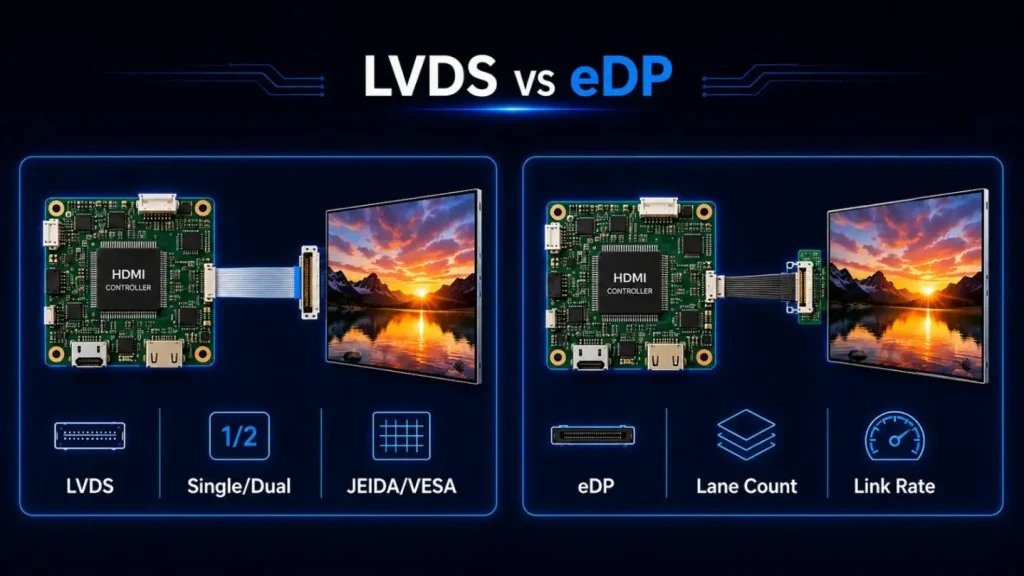
For an HDMI-to-eDP controller board, confirm:
• eDP lane count and link rate
• AUX-channel communication
• Panel power sequence
• Output color depth
• Backlight enable and PWM control
• Resolution and refresh-rate bandwidth
The same connector does not guarantee compatibility. The HDMI Controller Board, firmware, electrical mapping, panel timing and backlight system must be validated together.
An HDMI Controller Board is responsible for receiving, identifying, processing and converting HDR video. However, visible HDR quality is ultimately limited by the LCD panel, backlight, contrast, color depth and color gamut.
FaceLCD supports display projects requiring matched HDMI Controller Board, LVDS or eDP interface, resolution, brightness, color depth, EDID and firmware configurations. Share the LCD panel model, input format and application requirements with FaceLCD to evaluate a practical HDR display solution.
Q1. Can the EDID and firmware of an HDMI Controller Board be changed?
EDID and firmware are likely to be adjusted to fit the selected LCD panel and the desired application. Typical preferences include the display resolution, refresh rate, HDR, color format, startup, OSD, backlight and input order.
Prior to any firmware evaluation, customers must provide the detailed operating requirements.
Q2. Can FaceLCD customize an HDMI Controller Board to work with a specific LCD panel?
Yes. FaceLCD can evaluate specific LCD panels as necessary based on their datasheet, LVDS or eDP interface, supply voltage and backlight requirements. Compatibility is a concern for electrical and firmware levels rather than by connector appearance.
Q3. Is it the case that, by itself, an HDMI Controller Board makes an LCD panel HDR?
No, that is not correct. An HDMI Controller Board may process HDR, but the LCD panel and its backlight are the ultimate limits of HDR. True HDR performance is also dependent on peak brightness, black level, contrast, color depth, color gamut, and tone mapping accuracy.
Q4. Can FaceLCD offer HDMI-to-LVDS controller board matching?
Yes, FaceLCD can assess the requirements of HDMI to LVDS configurations within the scope of an LCD panel. Important operating parameters including preferred LVDS interface single or dual channels, mapping to JEIDA or VESA specifications, AUX communication as well as control of the power sequence and timing, backlight enable control and the required resolution.
Q5. Can FaceLCD provide HDMI-to-eDP display configurations?
FaceLCD can evaluate HDMI-to-eDP configurations to verify their operational functionality with the requirements of LCD panels. Important parameters for the evaluation of HDMI-to-eDP configurations may include the desired resolution, the required frame rate, HDR, color format with color space, a display controller startup, and the control of the timing and the backlight of the display.