
FaceLCD Hong Kong Limited
Tel: +8615818692944
E-mail: sales@facelcd.com
Address: 13F, Buiding B, Colorful Tech Park, Guanlan High tech park, Longhua Dist, Shenzhen,China ZIP code 518100
You are here: Home > Technology >
FaceLCD supplies custom resistive and capacitive touch-panel solutions for industrial LCD and control-equipment projects. The correct configuration depends on how operators will use the panel, the working environment, the LCD and housing dimensions, the interface, the cover glass, and the production requirements.
OEM buyers can send FaceLCD an LCD model, technical drawing, application details, touch requirements, and expected quantity for configuration review, sample development, and quotation.
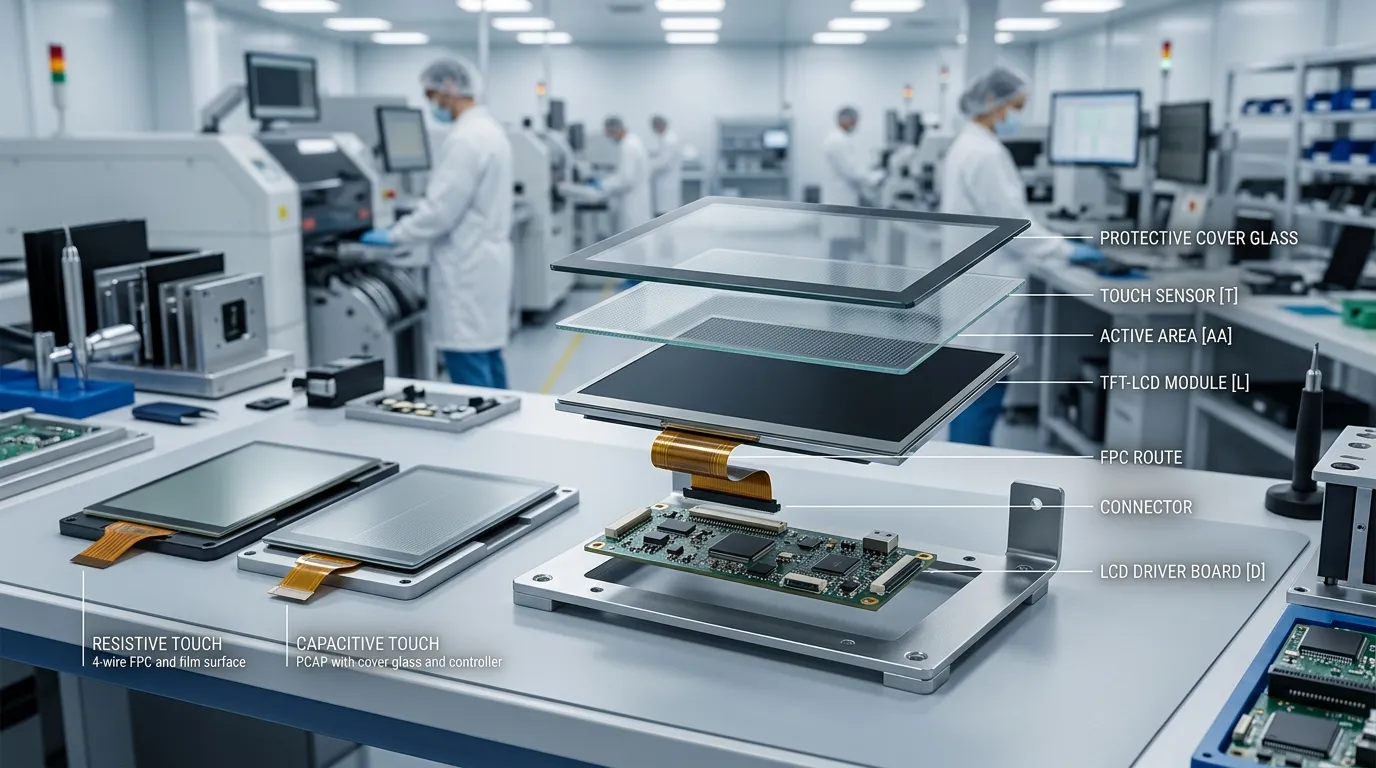
FaceLCD supports custom industrial touch-panel projects for equipment manufacturers that need the panel to match an existing LCD, enclosure, PCB, or front-panel design.
Available project options include:
Send your LCD drawing and industrial touch requirements to request a custom touch-panel assessment.
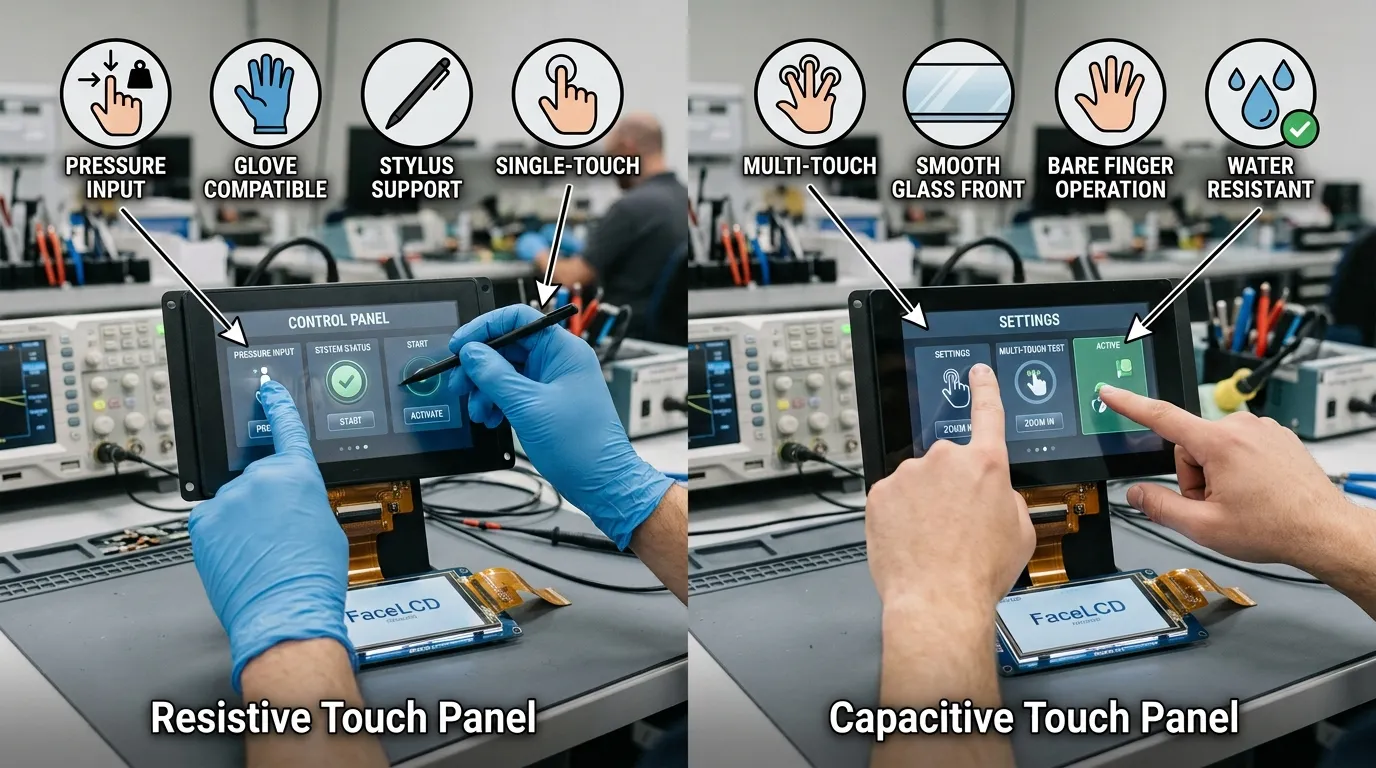
Both resistive and capacitive panels can be used in industrial equipment, but the correct option depends on the operator input method, interface design, environment, and front-panel structure.
| Project Requirement | Resistive Touch | Capacitive Touch |
|---|---|---|
| Pressure-based input | Strong fit | Not the primary operating method |
| Standard glove or stylus use | Often suitable | Requires validation of the glove, controller, firmware, and cover glass |
| Multi-touch gestures | Usually limited | Strong fit |
| Seamless glass-front appearance | Limited compared with capacitive structures | Strong fit |
| Simple menu and value entry | Strong fit | Suitable |
| Water on the surface | Generally tolerant depending on the complete assembly | Requires water-touch and false-touch validation |
| Custom decorative cover glass | More limited | Strong fit |
| Industrial HMI operation | Suitable | Suitable when correctly configured |
A resistive industrial touch screen panel may be appropriate when operators need pressure-based input, frequent stylus use, or reliable operation with standard work gloves. It can also suit equipment with simple menus, data-entry fields, and control buttons.
FaceLCD can review four-wire and five-wire resistive structures along with the required active area, panel outline, FPC route, cable length, connector, and LCD fit.
A capacitive panel may be more suitable when the product requires multi-touch gestures, finger operation, a smooth glass front, branded border printing, or a modern interface appearance.
FaceLCD supports G+G, G+F, and F+F capacitive structures. Glove operation and water-touch performance must be reviewed according to the controller, firmware, cover-glass thickness, front structure, and actual operating conditions.
For a more detailed technology comparison, see the difference between resistive and capacitive touch panels.
The term industrial does not describe one fixed specification. An OEM should provide clear operating conditions before FaceLCD recommends a touch technology, controller, cover-glass structure, or bonding method.
Confirm how the operator will control the equipment:
For glove use, specify the glove material and thickness. The project should also define the required number of touch points, gesture functions, button sizes, and interface layout.
Describe whether the front panel will be exposed to rain, water droplets, condensation, dust, oil, process residue, or cleaning fluids. The project should clarify whether touch input must remain active when the surface is wet and how accidental or false touches should be handled.
Cleaning frequency and cleaning chemicals should also be disclosed because they may influence the cover-glass treatment and complete front-panel design.
Confirm whether the equipment will be used indoors, outdoors, or under strong ambient lighting. Glare, reflection, fingerprints, display brightness, and bonding structure can all affect readability.
Anti-glare, anti-reflective, and anti-fingerprint treatments should be selected according to the actual environment rather than added without a defined requirement.
Provide the expected conditions for:
FaceLCD should confirm the feasibility and validation method for each project. Performance values should not be assumed without testing the selected touch panel, controller, glass, bonding, and enclosure structure.
A touch panel can use the correct technology and still fail to fit the final product. Mechanical and electrical integration details should therefore be confirmed before sample production.
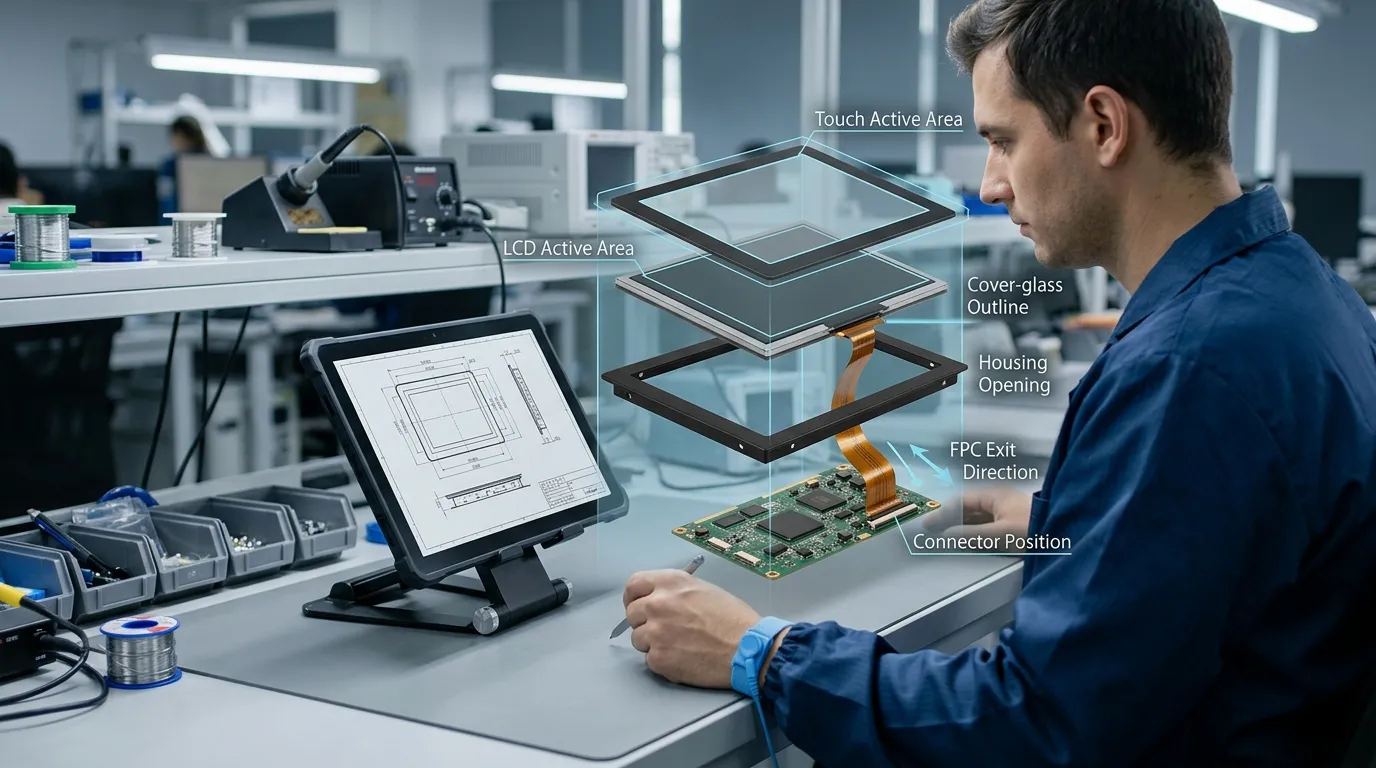
The buyer should provide the LCD model number, datasheet, or drawing. FaceLCD can then review:
The touch area and display area must align correctly. A mismatch may create visible borders, inaccurate touch positioning, or mechanical interference.
The housing design should define the front opening, bezel or flush-front structure, cover-glass outline, glass thickness, edge clearance, mounting arrangement, and sealing area.
Any buttons, ports, indicators, speaker openings, camera holes, or logo areas should appear in the drawing before the cover glass is finalized.
The FPC route must fit the available internal space without interfering with the enclosure, LCD frame, or PCB. Confirm:
Confirming these details early can reduce PCB changes, enclosure revisions, and sample delays.
For capacitive projects, the cover glass affects appearance, protection, optical performance, touch sensitivity, and housing integration.
FaceLCD can review requirements for:
Read more about cover-lens surface treatments for capacitive touch panels.
Air bonding and optical bonding can affect the thickness, clarity, reflection, appearance, and assembly structure of the complete display.
The review should include:
An ingress-protection rating cannot be assigned to the touch sensor alone. The finished front assembly, including the cover glass, bonding, gasket, seal, and enclosure, must be designed and validated as one structure.
Providing complete project information allows FaceLCD to review the design more accurately and recommend an appropriate configuration.
| Required Information | What to Provide |
|---|---|
| Application | Industrial HMI, test instrument, control panel, kiosk, handheld tool, or other equipment |
| LCD model | Existing module part number, datasheet, or drawing |
| Display and touch size | Active area and outer dimensions |
| Touch technology | Capacitive, resistive, or a request for FaceLCD’s recommendation |
| Input method | Finger, glove, stylus, or a combination |
| Touch points | Single touch, multi-touch, or another project requirement |
| Environment | Indoor or outdoor use, water, dust, oil, temperature, humidity, vibration, and electrical noise |
| Cover glass | Size, thickness, shape, printing, logo, openings, and surface treatment |
| Interface | I2C, USB, SPI, or another confirmed requirement |
| Controller and mainboard | Controller preference, host board, and operating system |
| FPC and connector | Direction, length, pin layout, and connector model |
| Bonding | Air bonding, optical bonding, or a request for assembly review |
| Protection target | Front-sealing or finished-enclosure requirements |
| Project stage | Concept, prototype, replacement, or production |
| Quantity | Sample quantity and projected production demand |
| Project files | LCD datasheet, 2D drawing, housing drawing, PCB layout, or STEP file where relevant |
Send these requirements to FaceLCD for a drawing review, sample discussion, and quotation.
FaceLCD provides LCD and touch-interface products for custom display projects. Its commercial touch-panel support includes resistive and capacitive options, panel customization, drawing review, sample development, and fit checks for the LCD, housing, FPC, and PCB.
Relevant business and project-support elements include:
OEM buyers can also review the broader FaceLCD custom touch-panel range, including dedicated capacitive touch-panel options and resistive touch-panel options.
Yes. FaceLCD can review custom requirements for the touch technology, panel dimensions, active area, cover glass, FPC, connector, interface, controller, bonding method, and LCD fit. Final availability depends on the project specifications.
Resistive touch is often suitable for pressure input, stylus use, and standard gloves. Capacitive touch is often selected for multi-touch operation, finger input, and a seamless glass front. The final choice should reflect the actual input method, environment, controller, glass, and interface requirements.
Resistive panels generally support pressure-based glove and stylus operation. Capacitive glove operation depends on the glove material and thickness, controller, firmware, and cover-glass structure, so the complete configuration must be validated.
Water-touch performance may be supported in a project-specific configuration. The controller, firmware, cover glass, front-panel structure, water conditions, and false-touch requirements must be reviewed before the capability is confirmed.
Yes. Provide the LCD model, datasheet, active area, outline dimensions, housing drawing, interface, FPC direction, and connector requirements so the panel-to-LCD fit can be reviewed.
FaceLCD can review custom cover-glass dimensions, thickness, shape, border printing, logo areas, FPC direction, cable length, connector type, and pin arrangement according to the project.
No. The final ingress-protection level depends on the complete front assembly, including the cover glass, bonding, gasket, seal, and enclosure. These elements must be designed and validated together.
Send the application, LCD model, drawings, touch technology, input method, operating environment, cover-glass requirements, interface, FPC details, connector information, bonding preference, quantity, and project stage.
Send FaceLCD your LCD model, application details, touch requirements, cover-glass drawing, interface, FPC direction, connector information, and expected quantity. The team can review the panel-to-LCD fit and recommend a resistive or capacitive configuration before sample development.
Contact FaceLCD to request a quotation, drawing review, or custom touch-panel sample.