
FaceLCD Hong Kong Limited
Tel: +8615818692944
E-mail: sales@facelcd.com
Address: 13F, Buiding B, Colorful Tech Park, Guanlan High tech park, Longhua Dist, Shenzhen,China ZIP code 518100
You are here: Home > Technology >
For an industrial LCD module, “high quality” is not a useful requirement unless the buyer and manufacturer agree on what will be inspected, how each check will be performed, and which results are acceptable. Effective LCD display quality control standards combine approved specifications, inspection methods, acceptance criteria, testing conditions, and documented results.
This guide explains the main stages of industrial LCD module quality control, from reviewing the original drawing to completing final inspection before shipment. It also separates FaceLCD’s publicly stated quality practices from certification names, numerical limits, and test procedures that should be confirmed directly for each project.

LCD display quality control standards are the documented requirements, inspection methods, acceptance limits, responsibilities, and records used to determine whether a display module is suitable for its intended application.
They can cover several areas, including:
Quality assurance and quality control are related but not identical. Quality assurance focuses on establishing a controlled process that reduces the likelihood of defects. Quality control focuses on inspecting and testing materials, assemblies, and finished modules to determine whether they meet the approved requirements.
Buyers sometimes treat product specifications, inspection plans, testing requirements, and certifications as if they are interchangeable. They serve different purposes.
The product specification defines what the LCD module must be. It may include the outline dimensions, active area, resolution, interface, viewing direction, brightness target, touch type, FPC design, connector position, cover glass, and operating conditions.
Inspection criteria define how the module will be checked. Acceptance criteria define which results will pass or fail. For example, a requirement for a clean active display area is incomplete unless the inspection distance, lighting, displayed test pattern, viewing angle, and acceptable defect conditions are also defined.
A certification provides evidence of conformity within a defined scope. It may relate to a factory management system, product requirement, restricted material, testing method, or target market. A certificate does not automatically explain every inspection performed on an individual LCD module.
FaceLCD has a dedicated certification area on its website, but specific certification names and numbers should be verified with the company before publication or purchasing decisions. Certificate logos or image badges should not be converted into textual compliance claims without checking the original documents, validity dates, and scope.
There is no single inspection plan that fits every industrial LCD project. The required quality checks depend on where and how the module will be used.
An industrial HMI, outdoor terminal, medical device, inspection machine, vehicle display, kiosk, handheld instrument, and smart-home controller may require different levels of brightness, temperature resistance, touch performance, mechanical stability, or cosmetic quality.
Before defining the inspection process, the buyer should clarify:
For broader information about module development and customization, buyers can review FaceLCD’s custom LCD display manufacturer capabilities.
Quality control should begin before materials enter production. The buyer and manufacturer need an approved reference that defines the expected product and the conditions under which it will be accepted.
The review should cover:
Vague requirements such as “perfect display,” “no defects,” or “industrial quality” should be replaced with measurable and mutually agreed criteria.
Incoming inspection is commonly used to prevent incorrect, damaged, or unsuitable materials from entering production. The exact procedure should be confirmed with FaceLCD for the individual project.
Typical incoming checks may include:
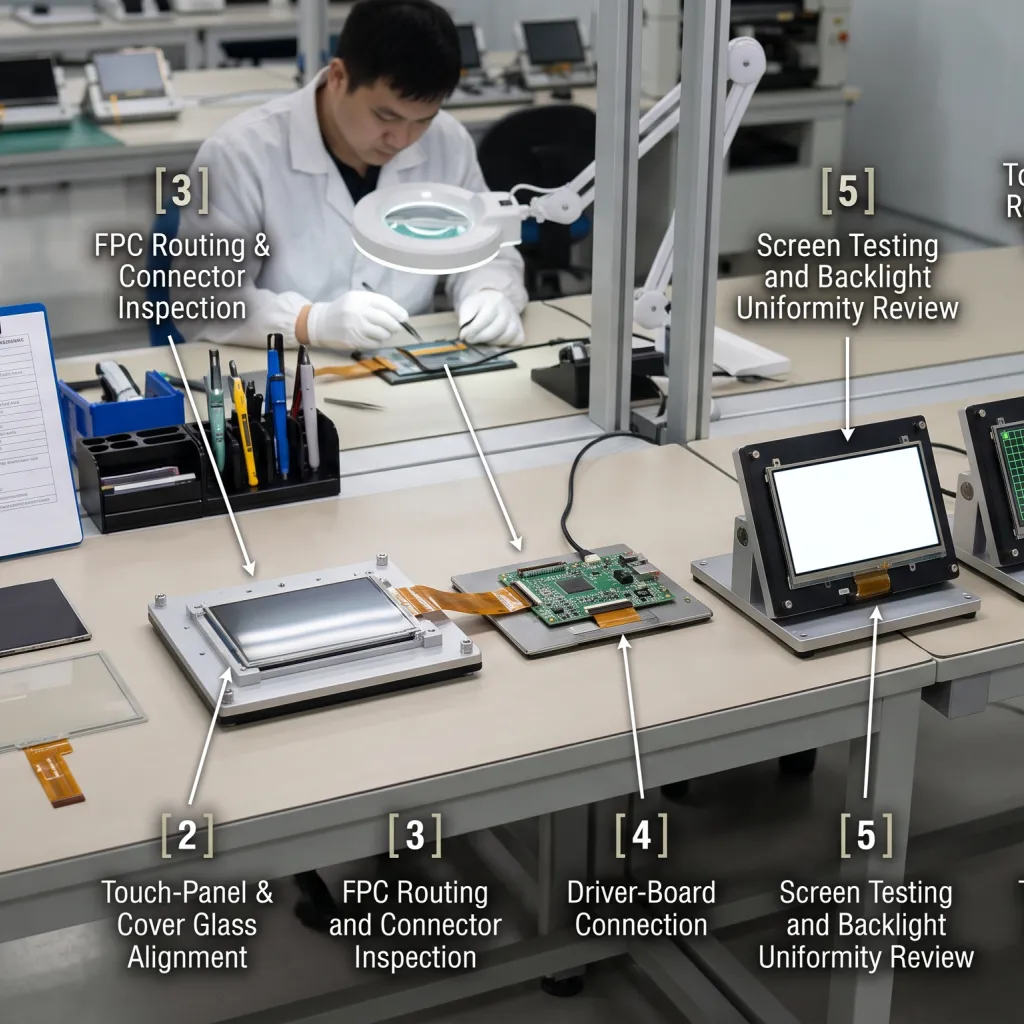
A functional LCD panel can still become defective during module assembly. Alignment, cleanliness, mechanical pressure, adhesive condition, and cable routing can all affect the completed module.
Important assembly controls include:
Projects involving integrated touch displays can review the LCD and touch-panel assembly process. Applications requiring reduced internal reflection or improved display clarity may also need a separate LCD optical bonding process.
Visual and dimensional inspection identifies problems that may not prevent the screen from powering on but can still cause rejection during equipment assembly or final product inspection.
Common checks include:
The module should be powered and checked with suitable test patterns. Full-white, black, primary-colour, and grayscale screens can reveal defects that are difficult to identify when a normal interface image is displayed.
Display testing may identify:
MURA refers to visible non-uniformity in brightness or colour. It may appear as cloudy regions, patches, lines, or uneven areas, especially when the display shows a solid colour or grayscale pattern. The viewing conditions and acceptance limits should be agreed before production.
A display can produce an image while still having backlight or optical problems. Depending on the project, the inspection may cover:
Numerical brightness, colour, and uniformity limits should not be copied from another project. Test equipment, warm-up time, measurement points, ambient lighting, viewing angle, and operating conditions can affect the result.
Electrical testing confirms that the LCD module works with the intended configuration. The inspection should consider more than whether the screen powers on.
Relevant checks may include:
Touch functionality should be tested separately from display output. A module can show a correct image while the touch layer has response, alignment, sensitivity, or communication problems.
Touch inspection may cover:
Reliability and environmental tests are not necessarily performed on every unit. Some are qualification tests conducted on selected samples, while others may be part of periodic production checks.
Depending on the application, testing may involve:
The required test method, sample quantity, duration, conditions, and acceptance limits should be agreed for the project. Buyers should not assume that all environmental tests are included in a standard pre-shipment inspection.
Final inspection confirms that the completed module matches the approved configuration and is ready for shipment.
The final review may cover:
FaceLCD’s publicly available product information states that its TFT-LCD modules receive 100% pre-shipment checks covering display, backlight, touch, and appearance. Buyers should confirm the exact inspection procedure, acceptance criteria, and available report format for their own project.
FaceLCD’s public website materials currently support several general quality-related statements:
Other details should be confirmed directly before they are described as FaceLCD-specific procedures. These include named certifications, certificate numbers, inspection sampling plans, pixel-defect thresholds, optical tolerances, environmental-test methods, ageing duration, calibration procedures, traceability systems, corrective-action procedures, and inspection-report formats.
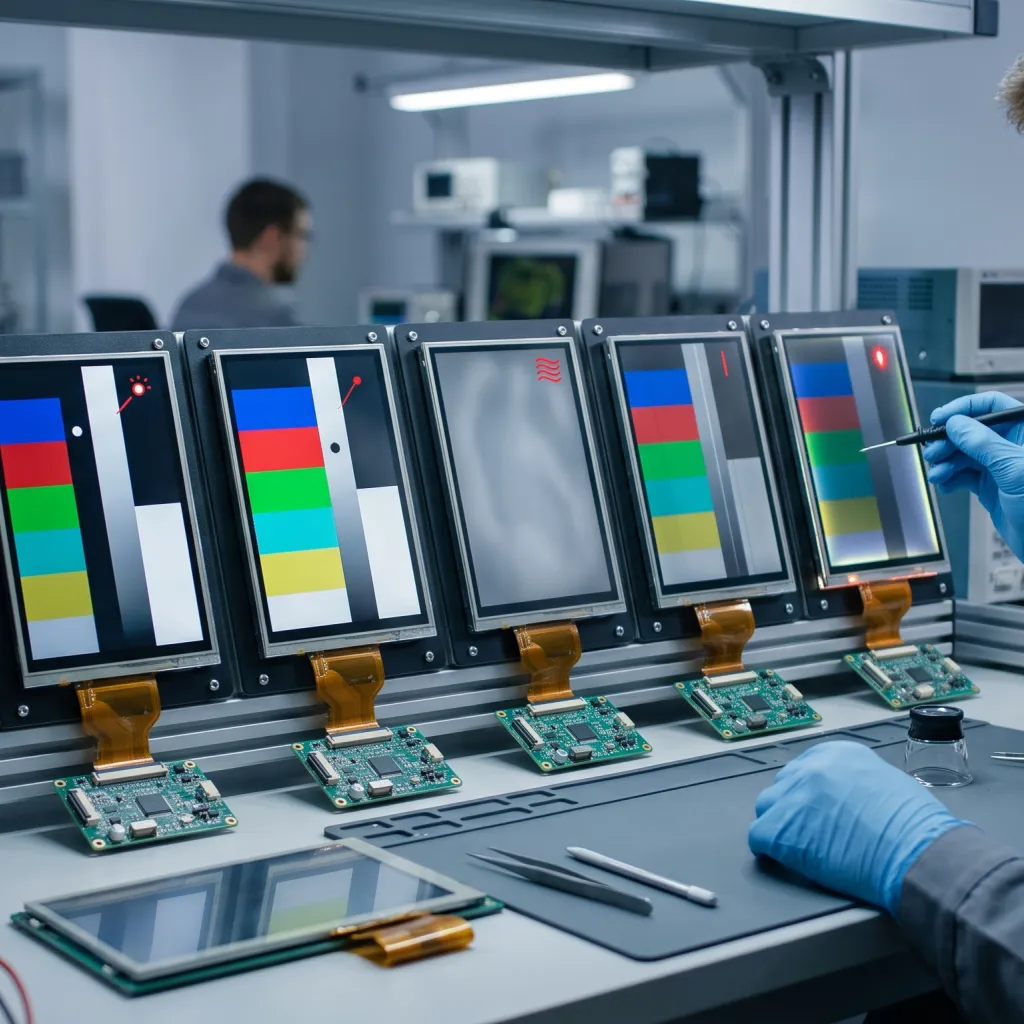
| Defect | Typical Sign | Relevant Check | Buyer Impact |
|---|---|---|---|
| Dead or dark pixel | A pixel remains off | Solid-colour test patterns | Visible image defect |
| Bright or stuck pixel | A pixel remains lit or fixed | Black and colour test patterns | Distracting bright point |
| MURA | Cloudy or uneven brightness or colour | White, grey, and uniform-pattern inspection | Reduced display uniformity |
| Horizontal or vertical line | A persistent line across the image | Functional display test | Possible panel, driver, or connection failure |
| Backlight non-uniformity | Bright and dark regions | Optical and visual inspection | Reduced readability and perceived quality |
| Flicker | Unstable illumination or image | Powered functional test | Unstable operation or user discomfort |
| Light leakage | Edge glow or a local bright region | Dark-image inspection under defined conditions | Cosmetic or structural concern |
| Dust or foreign material | A visible particle inside the assembly | Appearance inspection | Cosmetic rejection |
| Scratch, chip, or crack | Visible surface damage | Visual inspection | Cosmetic, structural, or safety concern |
| Bonding bubble | Air or adhesive defect | Inspection after bonding | Reduced clarity and appearance |
| Touch dead zone | An area does not respond | Coordinate or grid test | Loss of control function |
| FPC or connector problem | Intermittent or missing image | Electrical and connection check | Integration or field failure |
Consider a hypothetical industrial HMI that requires a specified LCD size and resolution, a defined interface, capacitive touch, printed cover glass, stable operation within an agreed environment, a specified viewing direction, and no visible particles in the active area under agreed inspection conditions.
Those requirements can be converted into the following inspection process:
This type of checklist gives the manufacturer a measurable target and gives the buyer a clear basis for sample and production approval.
Before requesting samples or mass production, buyers should prepare as much project information as possible.
Providing these details allows FaceLCD to confirm which inspections, tests, records, and project-specific controls can be included.
Effective LCD display quality control standards begin before production. They depend on an approved specification, clearly defined inspection conditions, suitable functional and visual checks, agreed acceptance limits, and documented results.
Buyers should distinguish routine unit-by-unit inspection from sample-based reliability testing and should distinguish factory or product certification from the actual inspection plan used for their modules.
For a custom project, send FaceLCD the application requirements, LCD or housing drawing, interface details, touch requirements, operating environment, and proposed acceptance criteria. Where specific compliance requirements apply, request verified certificates and confirm the testing scope before approving production.
They are the documented product requirements, inspection methods, test conditions, acceptance criteria, responsibilities, and records used to determine whether an LCD module is acceptable.
FaceLCD’s publicly available TFT-LCD product information states that it performs 100% pre-shipment checks covering display, backlight, touch, and appearance. Buyers should confirm the exact procedure, acceptance limits, and report format for their project.
Relevant defects can include dead or bright pixels, abnormal lines, flicker, MURA, light leakage, backlight non-uniformity, dust, scratches, bonding bubbles, damaged connectors, and touch dead zones.
Not necessarily. Environmental and reliability tests are often project-dependent and may be performed as qualification or sampling tests rather than on every production unit.
No. A quality-control standard or inspection plan defines how the module is checked and accepted. A certification provides evidence of conformity within a specific factory, product, material, management-system, or market-related scope.
They should be evaluated under agreed test patterns, lighting, viewing distance, viewing angle, operating conditions, and acceptance limits. A universal threshold should not be assumed for every application.
Buyers should provide the application, mechanical drawing, size, resolution, interface, brightness requirements, viewing direction, touch structure, cover glass, FPC, connector, operating environment, cosmetic requirements, and required documentation.
Yes. A display can produce a correct image while the touch panel has response, alignment, sensitivity, interface, bonding, or dead-zone problems.