
FaceLCD Hong Kong Limited
Tel: +8615818692944
E-mail: sales@facelcd.com
Address: 13F, Buiding B, Colorful Tech Park, Guanlan High tech park, Longhua Dist, Shenzhen,China ZIP code 518100
You are here: Home > Technology >
An LCD display for a handheld device has to do three things at once: stay readable in changing light, draw very little power, and fit a small enclosure. For most handheld products that means a TFT LCD between about 2 and 5 inches, an IPS panel if the screen is viewed from different angles, and an interface that matches the processor you already use.
This guide explains how to choose the size, panel type, brightness and interface, and shows real FaceLCD modules that fit handheld designs.
A screen inside a fixed machine has mains power, a stable viewing position and controlled lighting. A handheld scanner, tester or medical meter has none of these. It is held at arm's length, tilted, carried outdoors and run from a small battery, so the display has to be chosen around those limits and not around picture quality alone.
Four things usually decide the choice:
Start from the information the user must see on one screen, then pick the smallest display that shows it comfortably. A larger panel is easier to read but adds weight, cost and backlight power.
| Screen size | Common resolutions | Typical handheld use |
|---|---|---|
| 2.0 to 2.8 inch | 240×320 | Meters, simple testers, remote controls |
| 2.86 inch (bar format) | 376×960 | Smart appliances and slim controllers with vertical menus |
| 3.5 to 4.3 inch | 320×480, 480×800 | Barcode scanners, payment terminals, portable instruments |
| 5 inch | 800×480, 720×720 | Handheld HMIs and devices that show charts or images |
Tall, narrow formats are worth considering. They give several rows of data or a long menu without making the device wider in the hand.
Both are TFT LCD technologies. The difference is how the liquid crystals move, and that changes what the user sees from the side.
| TN panel | IPS panel | |
|---|---|---|
| Viewing angle | Narrower, colors shift when tilted | Wide and consistent |
| Color accuracy | Adequate for text and icons | Better for images and color-coded data |
| Cost | Lower | Higher |
| Best for | Simple, cost-sensitive devices | Devices viewed from many angles |
A handheld device is rarely held perfectly square to the eyes, which is why IPS is the more common choice today. Our comparison of TN and IPS displays covers the differences in more detail.
Brightness is measured in cd/m², also called nits. Indoor handheld devices usually work well at a few hundred nits. Devices used outdoors need considerably more, and a high brightness LCD display is the usual answer there.
Higher brightness means higher backlight current, so it is worth matching brightness to the real working environment instead of choosing the highest number available. An anti-glare surface treatment also helps, because it cuts reflections without using any power.
The interface decides how many pins you need and how fast the screen can refresh.
The FaceLCD 2.86 inch IPS TFT LCD (model FB028ESG313-A) shows how these choices come together in one module. Its tall 376×960 format suits vertical menus and several rows of data.
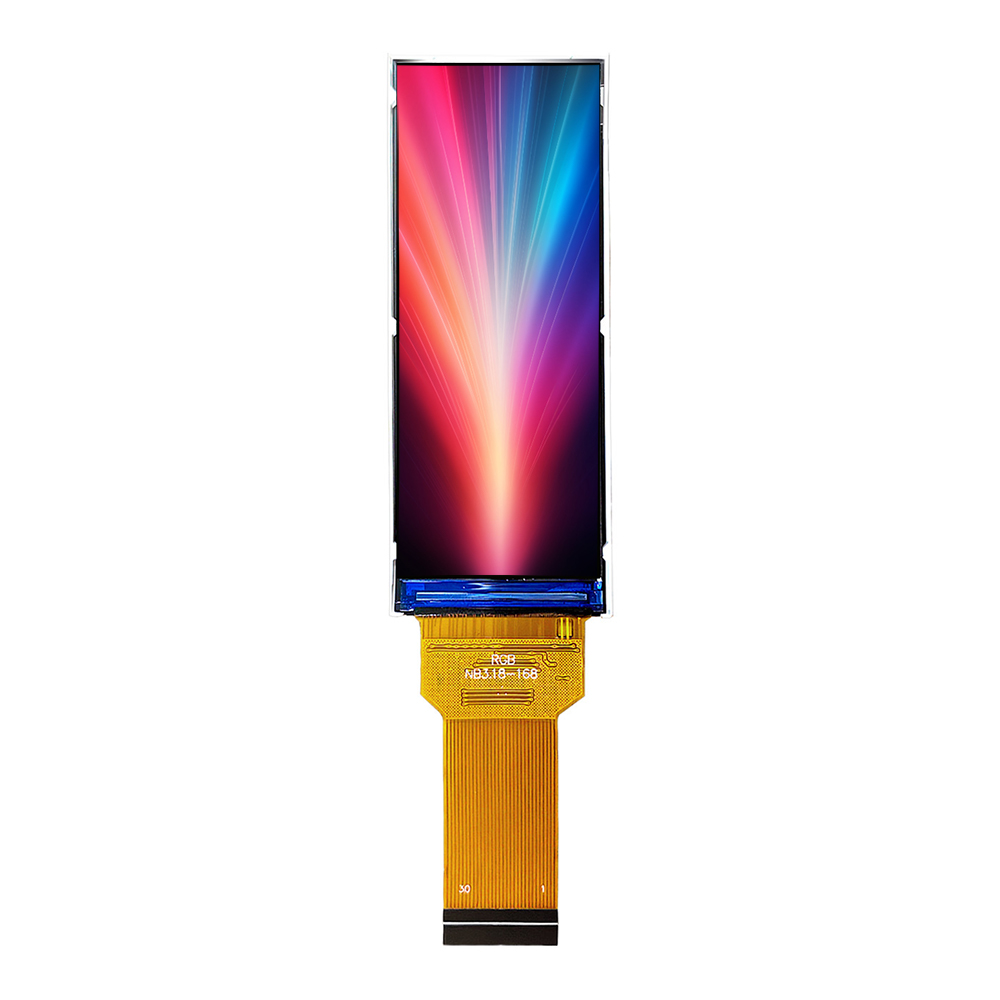
| Parameter | Value |
|---|---|
| Panel size | 2.86 inch |
| Model | FB028ESG313-A |
| Resolution | 376×960 pixels |
| Panel type | IPS |
| Interface | SPI 3-wire + RGB 18-bit |
| Brightness | 380 cd/m² |
| Surface | Anti-glare, 3H hardness |
| Supply voltage | 3.2 V |
| LED backlight current | 80 mA |
| Operating temperature | -20°C to 70°C |
| Storage temperature | -30°C to 80°C |
| Module | Resolution | Panel | Interface |
|---|---|---|---|
| 2.4 inch TFT LCD | 240×320 | IPS | SPI (MCU or MIPI) |
| 2.8 inch TFT LCD | 240×320 | IPS | SPI or MCU |
| 3.5 inch TFT LCD | 320×480 | IPS | RGB (MCU or MIPI) |
| 3.97 inch LCD | 480×800 | IPS | MIPI |
| 4.3 inch TFT LCD | 480×800 | IPS | MIPI |
| 5 inch TFT LCD | 800×480 | IPS | RGB |
You can browse the full range in the 0.96 to 4 inch and 4.3 to 6.8 inch categories.
Most handheld devices use a display between 2 and 5 inches. Choose the smallest size that shows the required information clearly, because a larger screen increases weight, cost and power use.
IPS is usually the better choice because the screen stays readable when the device is tilted. TN still makes sense for simple, low-cost products that show only text or icons and are viewed straight on.
Choose only as much brightness as the environment needs, dim or switch off the backlight when the device is idle, and pick a resolution that the processor can drive without extra hardware.
Yes. A capacitive or resistive touch panel can be added to most modules. Our guide to LCD modules with touch screen explains the options.
FaceLCD has supplied LCD modules, touch panels and driver boards since 2009, in sizes from 0.96 to 49 inches, with customization for size, interface, brightness and cover glass. If you are designing a handheld product, contact our team with your size, interface and brightness requirements and we will suggest a suitable module.