
FaceLCD Hong Kong Limited
Tel: +8615818692944
E-mail: sales@facelcd.com
Address: 13F, Buiding B, Colorful Tech Park, Guanlan High tech park, Longhua Dist, Shenzhen,China ZIP code 518100
You are here: Home > Technology >
Choosing the right open frame touch monitor supplier involves more than comparing screen size, resolution, and price. For an OEM project, the LCD module, touch panel, driver board, frame, cables, connectors, and enclosure must work together as one system.
FaceLCD provides these elements through one coordinated supply process. Instead of asking several vendors to solve separate parts of the same display project, OEM buyers can work with one team to review the monitor’s electrical, mechanical, and touch requirements before sampling. This helps reduce compatibility problems, unclear responsibility, and avoidable design revisions.
FaceLCD’s open frame monitor solution can combine the main display components required for installation inside industrial equipment, kiosks, terminals, control panels, and other OEM products.
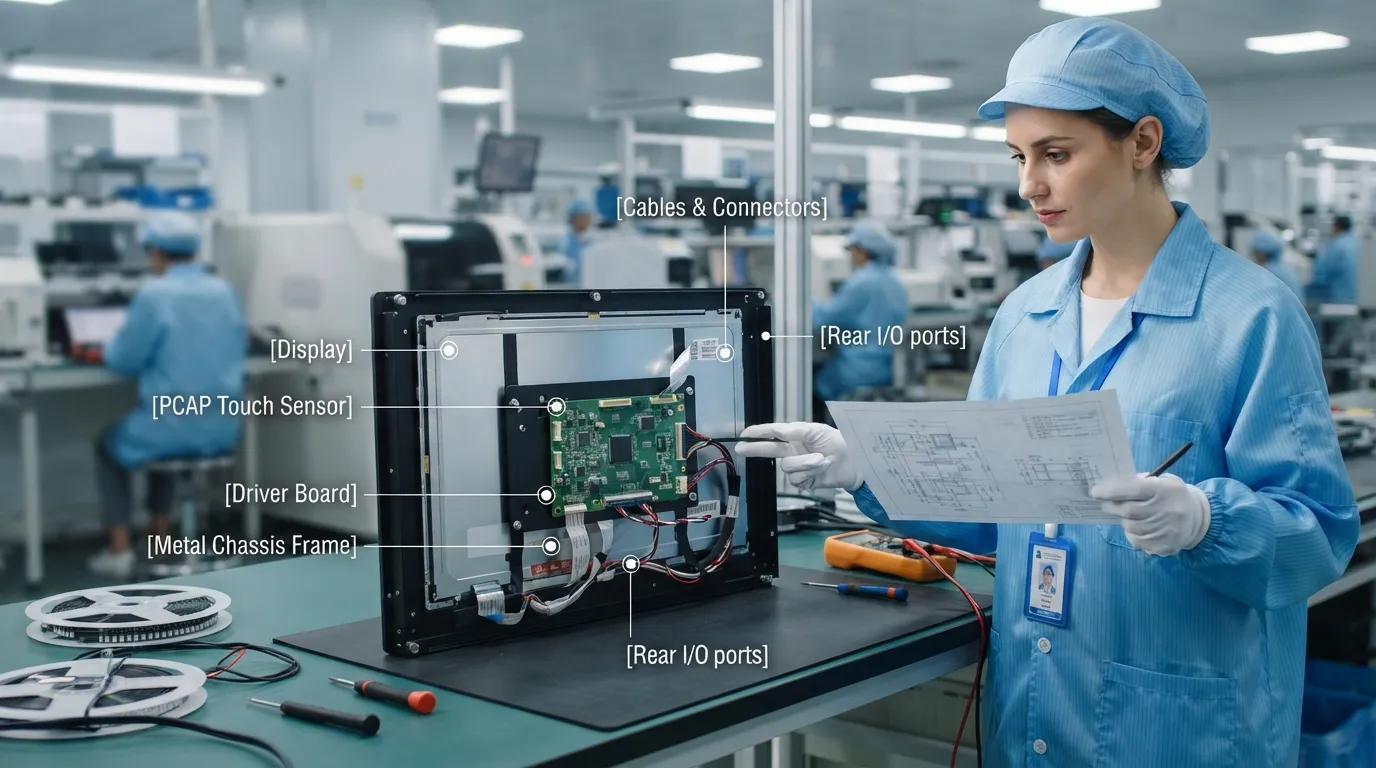
The LCD module is selected according to the final equipment requirements, including:
The selected panel must also match the driver board, frame dimensions, front-panel opening, and touch structure. FaceLCD reviews these elements together instead of treating the LCD as an isolated component.
Different applications require different touch structures. FaceLCD can review capacitive and resistive touch options based on how the finished equipment will be used.
Important decisions may include:
Projects that require a more specialized touch design can also refer to FaceLCD’s custom touch screen manufacturer capabilities. Buyers sourcing touch panels in larger quantities may review the available wholesale capacitive touch panels separately.
An LCD panel cannot operate correctly unless the control board supports its resolution, timing, interface, and power requirements.
FaceLCD can review:
Coordinating these parts with the LCD and touch panel helps prevent situations where the components fit physically but cannot communicate or operate correctly.
The open frame monitor must fit securely inside the customer’s equipment. Frame design therefore needs to consider more than the outer monitor dimensions.
FaceLCD can review:
| Supplied Element | Main Decisions | Integration Risk Reviewed |
|---|---|---|
| LCD module | Size, resolution, brightness, interface | Incorrect dimensions or signal mismatch |
| Touch panel | Touch type, cover glass, FPC, controller | Misalignment or incompatible touch operation |
| Driver board | Input, panel timing, resolution, power | No image, unstable output, or incorrect display |
| Metal frame | Dimensions, holes, brackets, depth | Monitor cannot fit the equipment enclosure |
| Cables and connectors | Length, direction, connector type | Routing conflicts or inaccessible connections |
| Assembled monitor | Complete component configuration | Responsibility divided between several vendors |
The main advantage of an integrated supplier is not simply receiving several components in one shipment. The real value comes from reviewing how those components interact before the monitor reaches the final equipment.
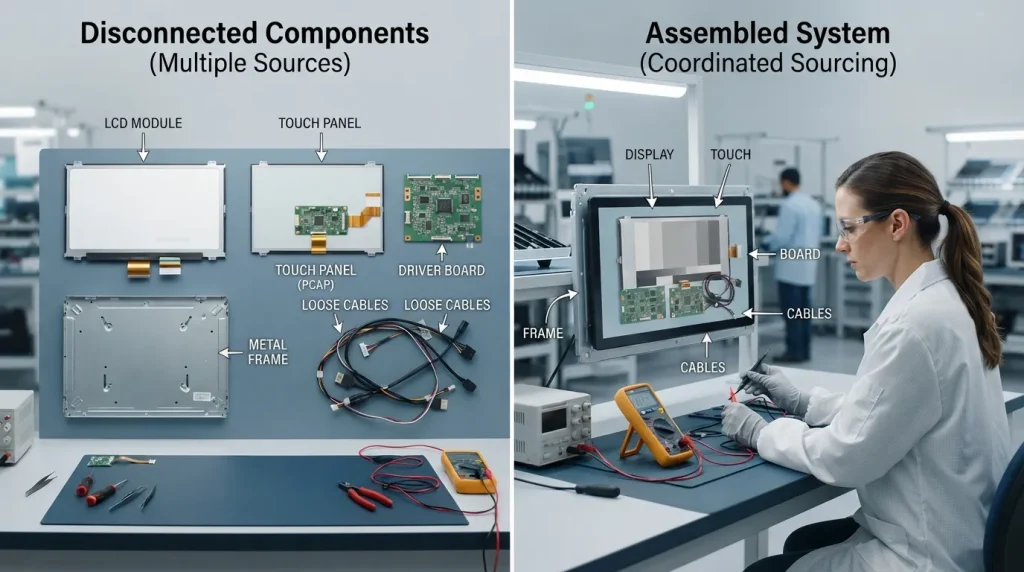
LCD selection affects the driver board. Touch-panel dimensions affect the cover glass and frame. Controller choice affects the interface and operating system. Cable direction affects the internal equipment layout.
When these decisions are reviewed through one coordinated project process, changes can be evaluated across the complete assembly instead of being passed between unrelated suppliers.
A monitor may meet the required display specifications but still fail to fit the enclosure because of:
FaceLCD can review the enclosure and monitor drawings before sampling. Detailed touch screen panel CAD drawings are especially useful when checking the cover-glass outline, active area, FPC position, and mounting dimensions.
The display panel, driver board, touch controller, host system, and power source must support one another.
An integrated review can confirm whether:
This does not remove every development risk, but it gives the OEM one coordinated path for reviewing the supplied display assembly.
When the LCD, touch panel, controller, frame, and board come from different vendors, identifying the source of a problem can take longer. Each supplier may confirm that its own component works separately while the complete system still fails.
With FaceLCD coordinating the main display assembly, the team can review the relationships between the supplied components instead of limiting troubleshooting to one part.
A multi-vendor project may require separate specifications, drawing revisions, quotations, samples, purchase orders, and technical discussions.
A coordinated supplier reduces the number of handoffs involved in the monitor assembly. This can simplify revision control and make it clearer which configuration has been approved for sampling or production.
Testing separate parts individually does not always show how they will perform after assembly. A coordinated sample can include the intended display, touch structure, board, frame, cables, and connectors.
This gives the OEM a more realistic configuration to evaluate inside the final equipment.
| Project Area | Separate Component Vendors | FaceLCD Coordinated Supply |
|---|---|---|
| LCD and board matching | OEM coordinates different suppliers | Display and board requirements are reviewed together |
| Touch and LCD alignment | Separate drawings must be reconciled | Touch and display dimensions are checked as one stack |
| Frame and enclosure fit | Frame vendor may not know the full layout | Frame, board, and cable positions are reviewed together |
| Revision control | Changes must be shared across several vendors | Main assembly revisions follow one project process |
| Troubleshooting | Responsibility may be divided | The supplied assembly can be reviewed as a system |
| Sampling | Components may arrive at different stages | A coordinated sample configuration can be prepared |
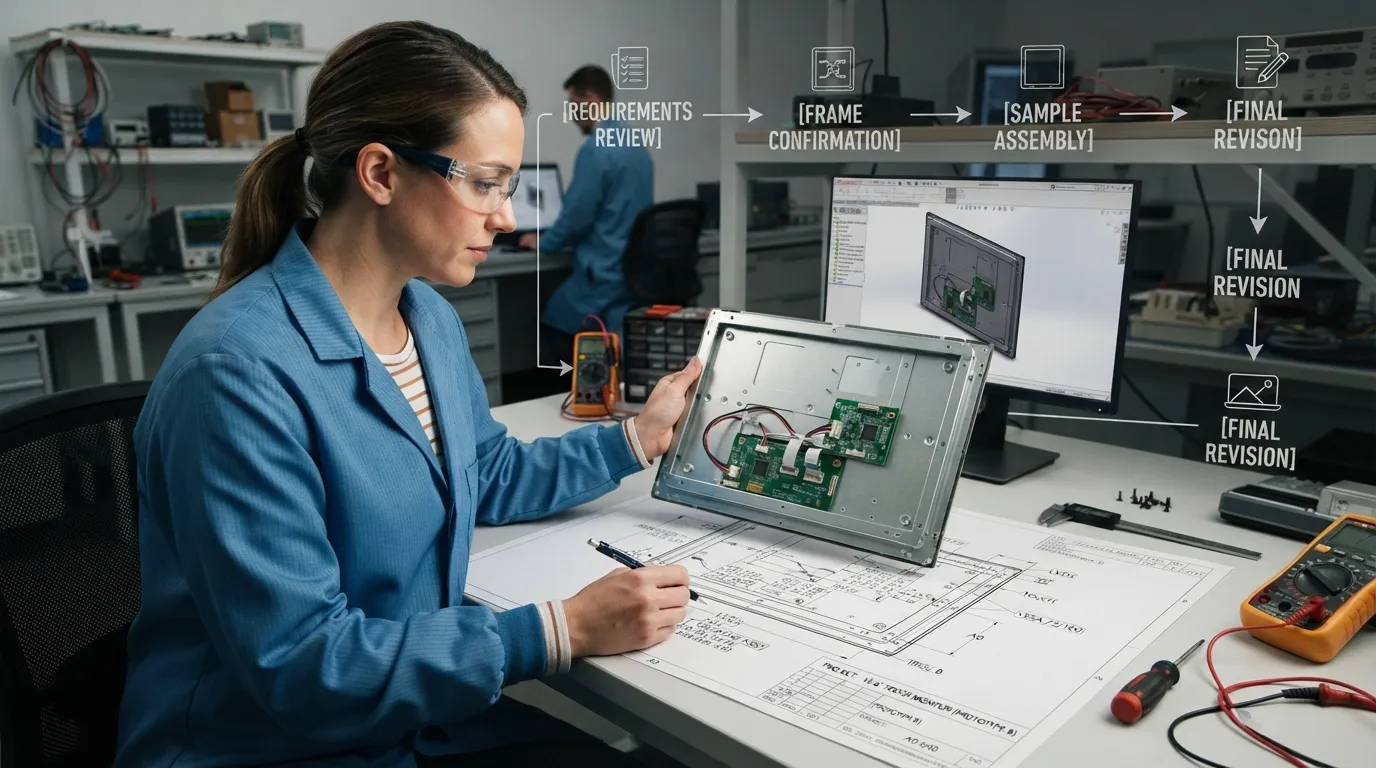
FaceLCD first reviews the basic project information, such as the application, screen size, resolution, brightness, touch type, host-system output, available power input, installation space, and operating conditions.
The enclosure or front-panel drawing is checked for mounting holes, opening size, maximum depth, board position, cable direction, connector clearance, and cover-glass requirements.
The selected LCD is matched with the required touch structure, controller, signal input, driver board, cables, and power arrangement.
FaceLCD then confirms how the monitor will be mounted and how the boards, cables, and connectors will sit inside the equipment.
A sample can be prepared for the customer to review display operation, touch response, physical fit, connection layout, and overall assembly.
Any required changes should be recorded in the drawings and component configuration before the project moves forward. This helps ensure that both sides are working from the same approved version.
Depending on the project, FaceLCD can review customization options such as:
The final configuration depends on the selected components and the technical requirements supplied by the customer.
FaceLCD open frame touch monitors can be considered for equipment such as:
The most suitable configuration depends on the enclosure, host system, touch method, environment, and required display performance.
Providing complete project information helps FaceLCD evaluate the configuration more accurately.
Include:
FaceLCD has worked in the LCD display industry since 2009 and operates factories in Shenzhen and Dongguan. Its product scope includes LCD modules, touch panels, LCD driver boards, monitors, and LCD all-in-one machines.
This broad product range allows FaceLCD to approach an open frame monitor as a complete display assembly rather than only a screen or frame. OEM buyers can discuss the display, touch, board, mounting, cables, and enclosure requirements through one project workflow.
The most useful proof for a custom project comes from the actual process. Buyers can request relevant product specifications, drawings, sample configurations, assembly details, and available production information before confirming an order.
Yes. FaceLCD can review the enclosure drawing, front-panel opening, mounting holes, available depth, cable direction, board position, and cover-glass requirements before proposing a configuration.
FaceLCD’s product scope includes LCD modules, touch panels, driver boards, frames, cables, and monitor assemblies. The exact supply scope should be confirmed for each project.
Yes. A mechanical drawing helps the team review dimensions, mounting points, glass outline, active area, FPC direction, board position, and cable clearance.
FaceLCD can review the existing LCD model and its specifications. If the original panel is unavailable or unsuitable, the team can evaluate possible alternatives based on size, resolution, interface, brightness, and mechanical requirements.
FaceLCD supplies both capacitive and resistive touch solutions. The suitable option depends on the required touch method, environment, cover glass, controller, and host-system interface.
Depending on the configuration, FaceLCD can review inputs such as HDMI, VGA, or LVDS, together with the required touch-controller and host connection. Final interface availability depends on the selected board and display.
A sample configuration can be prepared after the main electrical and mechanical requirements are confirmed. The customer can then review fit, display operation, touch response, and connections before moving forward.
Send the application, screen size, resolution, brightness, touch requirement, video output, power input, enclosure drawing, mounting details, operating environment, and estimated quantity.
Send FaceLCD your enclosure drawing, target screen size, signal interface, touch requirement, mounting details, and available power input. The team can review the LCD module, touch panel, driver board, frame, cables, and monitor configuration together and prepare a recommendation, sample plan, or quotation for your OEM project.